About EdSpark

AI that gives every student a method

EdSpark Technologies is committed to personalised, effective learning. We combine AI language models, knowledge graphs and algorithmic scoring into an adaptive practice system, backed by Accredited Star Tutors.

Who we are

Starting with DSE English

We believe quality, personalised teaching shouldn't be a privilege. The EdSpark system sets papers in DSE format, marks them against the marking scheme and breaks down every weakness; Accredited Star Tutors teach the method in class and follow up on the platform.

AI language models

Tutoring that understands how students write and speak, with feedback in context.

Knowledge graphs

Concepts connected so each learning path adapts to a student's needs and gaps.

Algorithmic scoring

Transparent, data-driven assessment and progress tracking.

How it works

From first login to real results

  1. Tell us where you're starting

    A short diagnostic lets EdSpark understand your strengths, gaps and exam target from day one.

  2. Get a personalised study path

    The AI builds a curriculum-aligned plan, generating exercises, drills and notes for your needs.

  3. Practise with instant feedback

    Every answer is marked and explained straight away, so you learn from mistakes as they happen.

  4. Track progress, adjust, repeat

    Teachers and students see clear performance dashboards, and the plan keeps adapting as skills improve.

The EdSpark system

EdSpark system features

Every tool is built around the real DSE format.

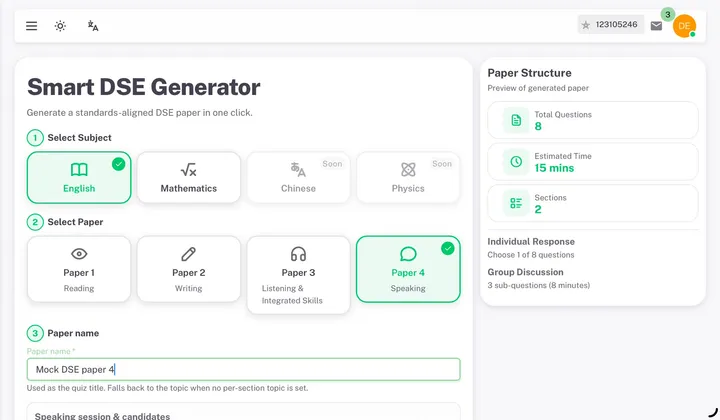
EdSpark system screen: Smart DSE Generator

Smart DSE Generator

Create curriculum-aligned quizzes and exam papers in seconds

  • One-click quiz and paper generation
  • HKDSE curriculum-aligned question types
  • Multiple question formats and difficulty levels
  • Advanced modification for passages
Full description

The Smart DSE Generator turns a blank page into a full, exam-ready paper in a matter of seconds. Pick a subject, choose the paper you want to build — Reading, Writing, Listening & Integrated Skills, or Speaking — and the generator assembles a complete set of curriculum-aligned questions around it, from short comprehension checks to full extended-response tasks.

Before you commit, you get a live preview of the paper structure: total question count, estimated completion time, and how many sections it spans, so you always know what a student is about to sit down to. Every paper can be renamed, restructured, and fine-tuned — down to editing individual passages and swapping question formats — so it fits the exact skill you're targeting that week, not just a generic template.

Because every question type is built against real HKDSE exam formats and difficulty bands, students spend their practice time facing the same structures, phrasing, and pacing they'll meet on exam day — not an approximation of it.
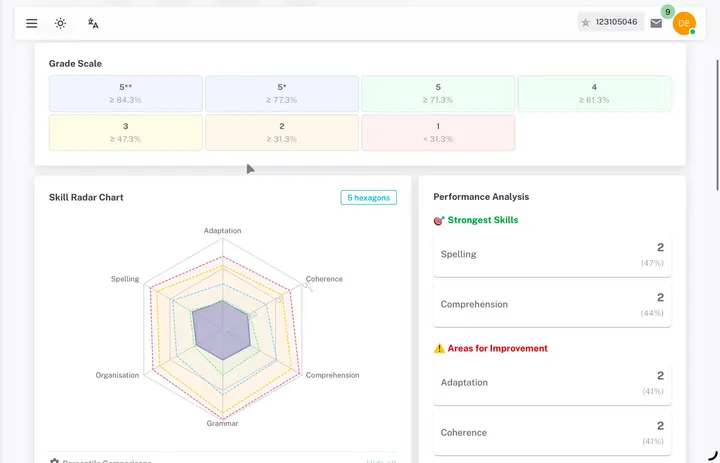
EdSpark system screen: Performance Dashboard for Quantitative Analysis

Performance Dashboard for Quantitative Analysis

See exactly where every student stands, at a glance

  • Skill grade radar chart
  • Percentile performance comparisons
  • Automated strength & gap analysis
  • Score summary by question type
Full description

Every paper a student completes feeds straight into their Performance Dashboard, turning raw scores into a clear picture of where they actually stand. A skill-grade radar chart breaks performance down by competency area — comprehension, grammar, structure, and more — so strengths and weak points are visible at a glance instead of buried in a single overall percentage.

Percentile comparisons show how a student is tracking against peers at the same level, while automated strength & gap analysis flags exactly which question types are costing the most marks. Instead of re-reading a whole paper to work out what went wrong, educators and students get a ready-made score summary by question type, so the next study session can go straight to the gap that matters most.

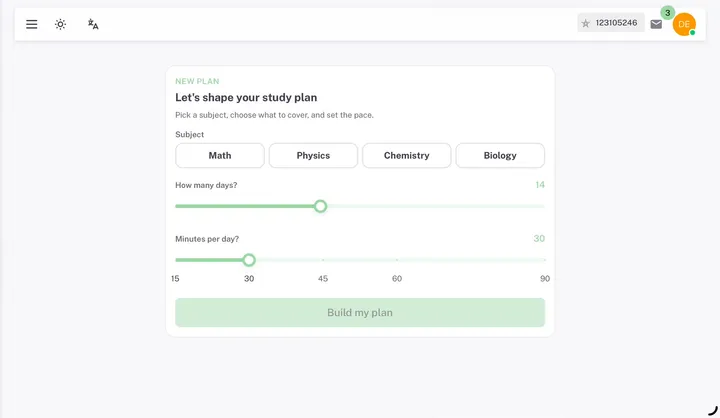
EdSpark system screen: Study Planner

Study Planner

Turn goals into a personalized learning roadmap

  • Built around your exam date and available time
  • Prioritizes weak topics for improvement
  • Balances workload with exam deadlines
  • Adapts to learning progress
Full description

Open-ended "study more" advice rarely turns into an actual habit. The Study Planner fixes that by turning a goal — a subject, a target grade, an exam date — into an AI-generated, day-by-day schedule. Pick how many days you have and how many minutes a day you can realistically commit, and the roadmap builds itself around real life instead of an idealized version of it.

The plan isn't static once it's built. It prioritizes whichever topics a student is weakest in, balances the daily workload against upcoming exam deadlines so nothing is left to the last week, and adapts automatically as new performance data comes in from every paper and practice session — quietly re-weighting future sessions toward whatever still needs the most work.

EdSpark system screen: Talk Anytime

Talk Anytime

Build confidence through AI-powered English speaking practice

  • Real-time AI conversation
  • HKDSE oral simulation
  • Speaking confidence building
  • Practice without time limits
Full description

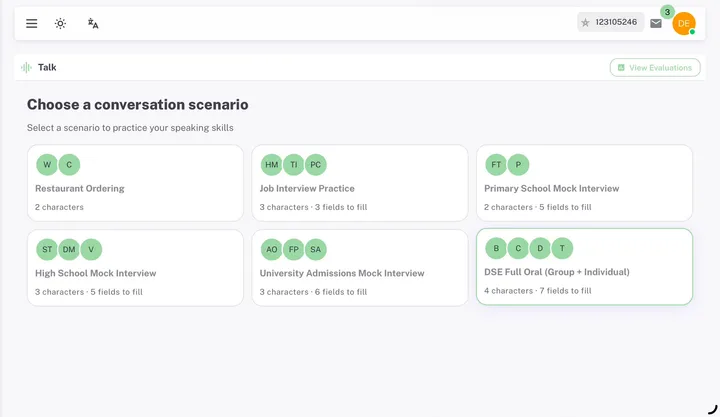
Talk Anytime gives students a library of real conversation scenarios to rehearse before they matter — from everyday situations like ordering at a restaurant, to high-stakes ones like a job interview, a university admissions mock interview, or a full HKDSE Oral simulation. Each scenario runs as a real-time AI conversation with multiple characters playing distinct roles, so group discussions feel like an actual group, not a single back-and-forth with a chatbot.

Because there's no clock, no classroom, and no waiting for a partner to be free, students can practice as many times as it takes to feel ready — repeating the exact scenario that makes them nervous until it stops being nerve-wracking. For an exam format built entirely around live spoken performance, that kind of low-stakes, unlimited repetition is exactly what turns hesitation into speaking confidence.

EdSpark system screen: Individual Error Bank for Revision

Individual Error Bank for Revision

Automatically collect mistakes and transform them into personalized revision

  • Automatic error collection
  • Topic-based organization
  • Smart revision suggestions
  • Targeted reinforcement
Full description

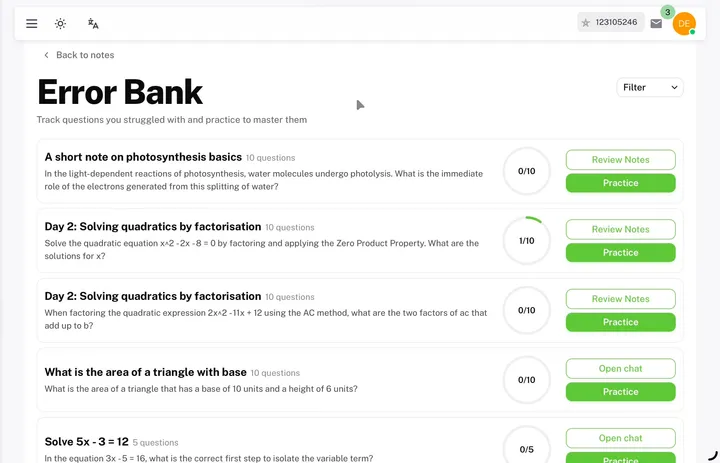
Every question a student answers incorrectly — across every subject, every session — is automatically collected into their Individual Error Bank instead of quietly disappearing once the paper is marked. Mistakes are organized by topic rather than left as one long undifferentiated list, so patterns become obvious: three missed questions on quadratic factorisation read very differently from three unrelated one-off slips.

From that organized view, the system generates smart revision suggestions built specifically around each student's own mistakes, then delivers targeted reinforcement — fresh practice questions on exactly the topics that tripped them up — until the gap actually closes. It turns every wrong answer into the most efficient, personalized revision material a student has, rather than something they simply move past.

EdSpark system screen: AI Tutor

AI Tutor

Learn through guided Socratic questioning that develops understanding instead of memorization

  • Step-by-step guidance
  • Curriculum-aligned explanations
  • Personalized learning support
  • Available 24/7
Full description

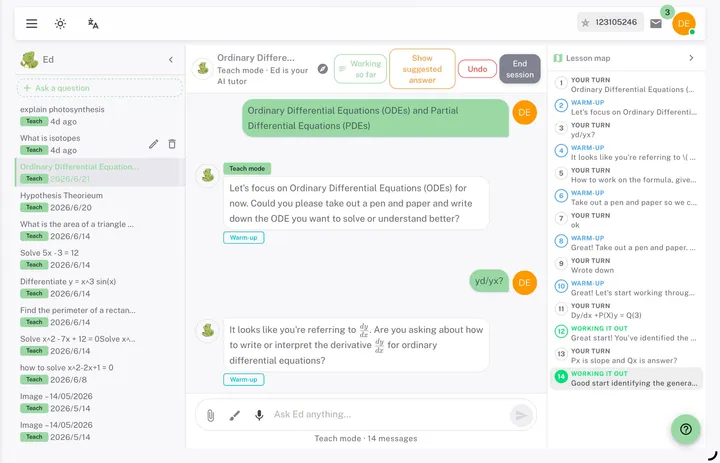
The AI Tutor is built to teach, not just answer. Instead of handing over a solution immediately, it opens with a warm-up question, asks the student to attempt the working themselves, and only offers a suggested answer as a safety net when they're genuinely stuck — Socratic, step-by-step guidance that develops real understanding instead of memorized steps that fall apart on a slightly different question.

Every explanation stays curriculum-aligned to what the student is actually being examined on, and the support adapts to how that individual student is progressing — moving faster through concepts they've clearly grasped, slowing down and re-explaining wherever they're still shaky. Because it never sleeps, that same patient, personalized tutoring is available 24/7, whether a question comes up during homework at 4pm or last-minute revision at midnight.

EdSpark system screen: Smart Grader

Smart Grader

Instant, step-by-step marking from a single photo

  • Mark handwritten work from a photo in under a minute
  • Equation and Writing modes for maths or written responses
  • Step-by-step marking scheme with weak spots flagged
  • Editable question and response read-back for accuracy
Full description

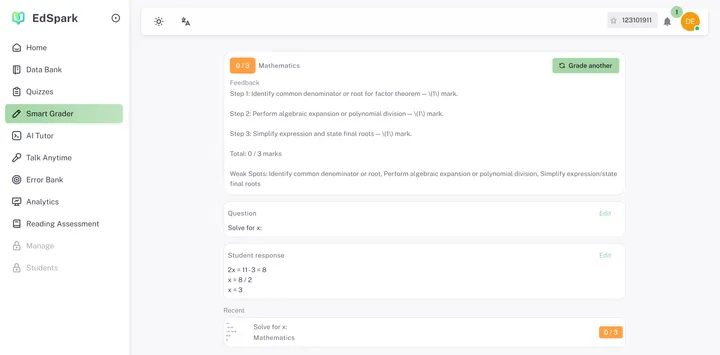
Smart Grader marks a single question straight from a photo in about a minute — no quiz or assignment needed. Choose Equation mode for maths or Writing mode for essay-style responses, then frame the question in the viewfinder and capture or upload it. The AI reads the question back so you can check and correct anything it misread before moving on.

Next, capture or upload a photo of the student's working — handwritten class work, a worksheet answer, or something on a whiteboard — and Smart Grader marks it against the question in roughly a minute. The result shows a score out of the question's total marks, plus a step-by-step marking scheme that breaks down exactly where marks were earned or lost.

Every result also flags specific weak spots, keeps both the question and the student's response editable in case a photo was misread, and saves each grading under Recent so nothing gets lost between one-off checks. It's built for the moment marking needs to happen right there in the classroom, not after work has been typed up or formally submitted — a different job from in-quiz auto-grading, which marks assignments students submit through the platform itself.

Versions

DSE and GCSE versions

HKDSE

DSE version

For students taking HKDSE English. Fine-tuned with DSE past papers, local study notes, textbooks and Hong Kong-specific materials for relevant guidance and exam strategy.

GCSE

English GCSE version

For UK students preparing for GCSE English Language and Literature, combining Cambridge English resources with GCSE-specific content aligned to exam formats, question styles and assessment criteria.

About the GCSE version
What we stand for

The values behind every feature

Result-oriented

We focus on outcomes you can see: grades, confidence and consistency, not just engagement numbers.

Access for everyone

Quality personalised teaching shouldn't be a privilege; we price and build to reach more students.

Educators, empowered

EdSpark supports teachers and tutors rather than replacing them, freeing time for real mentoring.

Transparent by design

Every score, recommendation and report can be explained. No black-box grading.

EdSpark Team

Meet the team

Photo of Franky Poon
“We are building a learning ecosystem that is inclusive by design, intelligent by intent, and committed to the success of every student.”
Franky PoonEducationist, Chief Strategist
Photo of Adrian Kam
“We spark education with technology.”
Adrian Kam
Photo of Marco Wong
“With EdSpark, we light the path to equal study opportunities, so every learner has the resources to shine.”
Marco Wong
Photo of Cindy Wong
“Education is no longer a privilege.”
Cindy Wong
Schools

Schools and tutoring centres

Schools and education providers can bring in the EdSpark system with volume pricing. Students with a Campus Partner code get HK$50 off their EdSpark system plan every month.

  • Campus Partner code: HK$50 off every month
  • Volume pricing for schools and tutoring centres
  • Demos tailored to your curriculum and class size

Contact us

For any enquiry, email or WhatsApp us.

[email protected]

+852 9680 9570

WhatsApp a course advisor
Try a lesson for HK$50